
I’m Nicola, the Marketing Administrator at Resolve, and over five working days I built Copilot into my normal workflow. No big AI strategy. No unrealistic use cases. Just real tasks, real pressure and a very full to-do list.
What surprised me most wasn’t that Copilot could do clever things. It was how much time, mental effort and friction it quietly removed, without changing how I work.
Here’s what those first five days looked like, and why they matter whether you’re a managing director, IT manager, finance director or operations director.
Day 1: Understanding our audience in minutes, not hours
We recently started a Copilot mailing list, I’m sorry for the shameful plug, sign up here. Naturally, I want to know more about who has signed up to help me target the content better.
My first task for Copilot was to look at the list of job titles of people that had signed up to our mailing and compared them to our buyer personas.
Normally, this means Excel formulas, manual grouping, checking and re-checking.
With Copilot:
- I asked it to group job titles into our existing buyer personas
- I asked for a pie chart to visualise them.
The result?
A lovely pie chart showing that all four personas were well represented and 16% were classed as 'other'. Very useful to know the personas are correct, but also tells me the weighting of each.
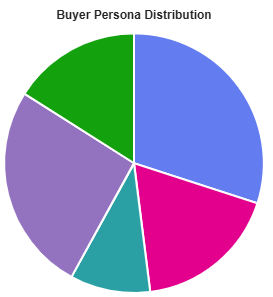
What matters isn’t the chart itself. It’s the fact that a task that would have taken me the best part of an hour, instead it took minutes and gave me confidence in the data. It is now something I can easily monitor as our mailing list develops.
Day 2: Writing better social posts
Having been on social media since its inception, I have been reluctant to let AI touch my socials posts.
But, I want it to make what I’ve written better.
So, on day two, I created a Copilot agent trained using:
- The last 12 months of Resolve LinkedIn posts
- A clear set of rules:
- UK spelling and grammar
- No em dashes
- Add suitable hashtags and emojis
- Keep the tone aligned with previous posts
- Adapt wording slightly for different platforms
Now my workflow looks like this:
- I write the post
- Copilot refines it
- I make the final call
It’s like having a built-in proofreader who knows our brand.
And honestly? Finding and adding suitable emojis is usually such a faff, but I love how much they make posts sparkle.
Day 3: Creating branded graphics without a design brief
On day three, I set up another Copilot agent, this time for visuals.
I asked:
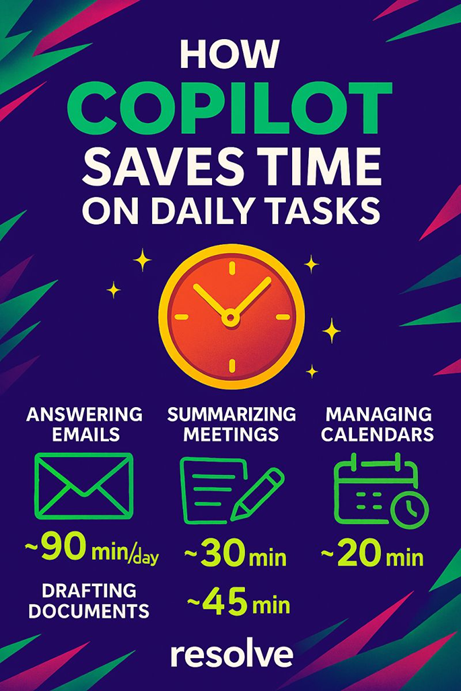
“Make me an exciting and cool looking graphic for LinkedIn in Resolve branding and colours that shows how Copilot can save time on day-to-day tasks.”
We’d tried this a few months before, and while the result was interesting… it was also slightly mad. Judge for yourself, it’s below:
This time?
- The design was cleaner
- The branding was consistent
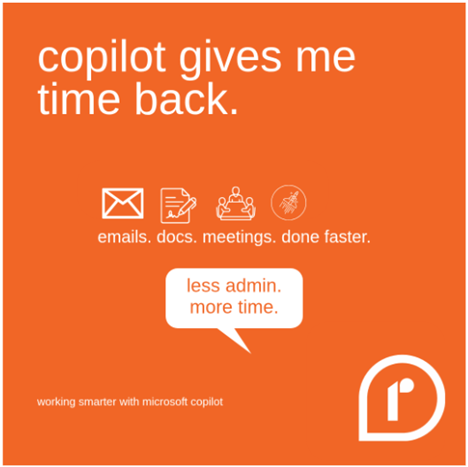
But it really wasn’t great. It didn’t replace a designer.
However, it was a start. Getting the branding correct is impressive. The agent either needs refinement or better prompts. The prompt I gave really was very vague and above is just the first graphic it made.
I am confident this can be improved on and be really useful in the future.
Day 4: Turning “Might be of interest” into clarity
As occasionally happens, a long thread was forwarded to me, with the words at the top:
“Might be of interest.”
Instead of reading the whole thing, I clicked the handy button, “Summary by Copilot”.
In seconds I had:
- A clear overview of the topic
- The key points
- Enough context to decide if it deserved my time
With Copilot reading the full thread felt purposeful, not painful.
Day 5: Asking it to write a blog post
On day five, I decided to try out Copilot in writing this blog post. I gave the agent some quick pointers about each day and asked it to write this blog. The first draft completely ignored my detailed prompts and instead produced something very generic, full of vague phrases like “on day one, I dipped my toe in” and very little substance.
That was a good reminder that AI doesn’t always get it right first time, even when I felt I was clear.
So, I went back, tried again and was much more explicit about what I wanted from each section. This time, the results were completely different. It produced a genuinely fantastic first draft that reflected my experience far more accurately and gave me a strong foundation to work from.
There is still more work to be done, for instance there were several em dashes for no reason, which I can either explicitly ask to remove in the prompt, or I can adjust a setting in the agent for blog writing.
Of course, as a marketing professional, it still went through several rounds of editing before we felt it was ready for publishing. But that’s only because our publishing standards at Resolve are so high, not because the tool fell short. In fact, having a solid draft to improve made the whole process far more efficient.
This final day really highlighted the importance of prompting, iteration and review. AI can be incredibly powerful, but it works best when you challenge it, guide it and treat it as part of the process rather than the finished product.
So… how much time did Copilot actually save?
This week was all about experimenting and testing the capabilities of Copilot. I really enjoyed building agents. They did take extra setup time, but they ultimately saved me time overall and were genuinely fun to use. It was exciting to see what Copilot could create, and with more practice, I can see myself using it more as a helpful day-to-day assistant.
I’d love to hear your real-world examples. What have you tried, what worked and what didn’t?
If you are interested in learning how Copilot can help your business, email solutions@resolve.co.uk or call 0114 2134 555 to book a demo.