Why does your business need Microsoft Copilot when ChatGPT is free?
Why bother with Microsoft Copilot when you can use ChatGPT for free? That’s an interesting question, and one we hear a lot. AI tools have quickly become an essential part of our lives, both at work and at home and for good reason. They help us work smarter and faster. However, there are some important security considerations, especially when using the free version of ChatGPT for work.
In this blog we will discuss the differences between Microsoft Copilot and ChatGPT and which one we’d recommend for businesses. We will cover why both have value, and why we strongly recommend Copilot for organisations that rely on Microsoft 365.
What is ChatGPT?
ChatGPT is a brilliant standalone AI tool created by OpenAI. You access it through a website or app rather than through your business tools.
It is fantastic for tasks like:
- Content creation and marketing ideas
- Explaining complex topics
- Creative problem‑solving
- General assistance and questions
Both free and paid versions are available, with the paid plans offering faster responses and more powerful models.
But there’s a crucial concern:
Anything typed into free ChatGPT can be used to improve its AI models.
That means you should never enter confidential, sensitive, or internal business information unless you have the paid enterprise version. Samsung learnt this the hard way, when sensitive internal source code was uploaded by an engineer. The concern is that data you give to ChatGPT could be given to other users.
What about Microsoft Copilot?
Microsoft Copilot is built directly into the Microsoft 365 apps that your team already uses and loves like Word, Excel, Outlook, Teams and PowerPoint. There is no switching tabs, no learning curve, no disruption. It simply works as an assistant where you work.
Copilot can help you:
- Draft emails, documents, and reports in seconds
- Summarise Teams meetings so nothing gets missed
- Analyse Excel data without formulas or specialist skills
- Automate repetitive workflows across your Microsoft tools
- Work securely, using the same policies your business already relies on
There is a free version, but the paid Copilot licence is where businesses see the real impact.
Its features are:
- Unlimited use
- Deeper integration
- Enterprise‑grade security
- It also doesn’t integrate into the Microsoft 365 environment your teams work in every day
But, most importantly:
Copilot does not train on your business data.
Your information stays within your Microsoft business account and is protected by your existing security, access controls and compliance settings. However, it is worth keeping in mind that you must check all your internal security and access controls before you switch it on. If not, staff could ask Copilot questions like “who earns the most?” and get access to confidential information. Work with your IT provider to ensure the set-up is correct before proceeding.
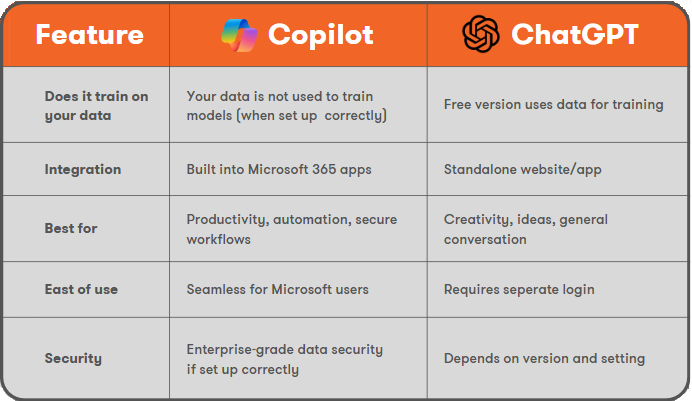
Key Differences That Matter for Your Business
Which Should Your Business Choose?
Choose Microsoft Copilot if:
- You already use Microsoft 365
- You care about data security (and you should)
- You want AI that works inside Outlook, Teams, Word, Excel, PowerPoint
- You want to automate workflows and increase productivity safely
- You need enterprise compliance and access controls
For most organisations, Copilot is the clear winner because it enhances the tools your team already uses while keeping your data protected.
Choose ChatGPT if:
- You’re not working with confidential information
- You want a flexible conversational AI outside of Microsoft tools ChatGPT is excellent but not built for handling sensitive business information unless you pay for enterprise‑level licensing.
The Best Approach? Use Both.
Many businesses use both tools together (and effectively):
- Copilot for any task involving business data, documents, email or workflows
- ChatGPT for creativity, idea creation and anything that doesn’t use your data
This lets teams enjoy the best of both worlds while keeping sensitive information exactly where it belongs: inside your secured Microsoft environment.
In conclusion
AI is a wonderful tool that removes repetitive work, speeds up writing and can spark better ideas, however it also has some pretty serious security implications, especially if you are relying on the free version of ChatGPT.
ChatGPT is powerful, but for businesses that run on Microsoft 365, value data security, and want seamless productivity gains, Copilot is the AI tool built for you.
At Resolve, we have already really benefitted from Copilot, and our team explain some of the ways they have integrated it into their working day in this video:
If you would like to learn more about AI and Copilot, we have a Copilot specific mailing list called Can't AI Do That? You can sign up here.
We have helped numerous businesses get prepared for Copilot and even hosted a Get Started with Copilot Webinar. To find out how we can assist your business contact us on solutions@resolve.co.uk or 0114 213 4555.