
Coming back to work after a holiday can feel a little overwhelming. Your inbox is full, meetings have piled up and there are a dozen things competing for your attention. The good news is that Microsoft Copilot can help take some of the pressure off. You can use AI to quickly understand what you've missed, prioritise what matters, and get your day back under control.
Take control of your inbox
One of the quickest ways Copilot can help is by summarising your emails. Instead of reading through every message like it is 2021, Copilot can provide a concise overview of important conversations, highlight key decisions and identify actions that need your attention. This is particularly useful after a week or two away when email threads have grown lengthy and discussions have moved on. In minutes, you can understand what's happened and focus your time where it will have the biggest impact.
How to summerise an email thread:
1. Open the email
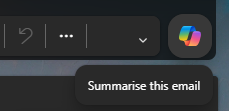
2. Hover your mouse over the Copilot logo and choose the top option 'Summarise this email'.
How to summarise all recent emails:
- Click the Copilot logo
- Type ‘Summarise all of my emails that arrived in the last week.’

Prioritise with a to-do list
Copilot can also help organise your day and create a practical to-do list. You can ask it to review your emails, meetings and recent conversations, then suggest the most important tasks for the day. Instead of wondering where to start, you'll have a prioritised list of actions waiting for you. Copilot can even help estimate what needs doing first, draft responses to routine messages and remind you about upcoming meetings or deadlines, helping you feel back in control much faster.
How to create a to-do-list:
- Open Copilot and type, ‘Review my emails, meetings and prioritise tasks for today.’ This can be modified for your specific situation.

Catch up on missed meetings
Another area where Copilot can be a real time-saver is with meeting preparation and follow-up. If you have missed meetings while you were away, Copilot can summarise meeting notes, highlight key discussion points and identify actions assigned to you.
How to get caught up on a project:
- What is happening with <insert project name>. Please link relevant documents.

Get started efficiently, without the stress
Returning from holiday doesn't have to mean spending days catching up. With Copilot, you have an AI assistant that helps you get back up to speed in no time.
Copilot can summarise email threads, highlight important conversations, and help you quickly understand what you've missed. It can also prioritise your workload, create a practical to-do list and prepare you for upcoming meetings, giving you a clear plan for the days ahead.
If you'd like to learn more ways to get the most out of Copilot, sign up for our bi-monthly updates here.