The system for handling e-mails in SBS (Exchange) sets a default for the size of individual mailboxes.
By default, each mailbox is 200MB in size, but will issues warnings at 175MB.
For most organisations this is too small – so in this article we show you how to increase this size.
Open up the Server Management Console, then expand the Exchange Server Settings (usually named “Your Organisation – Exchange”). Then browse to the Servers and then “Your Server”, then to the First Storage Group, and then right click -> properties on the Mail Box Store.
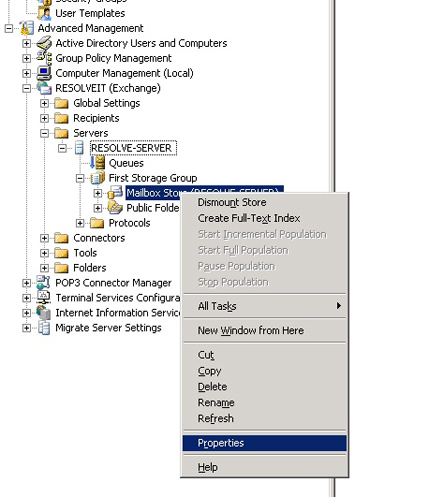
This then brings up the properties for the Mailbox Store. You want to click on the “Limits” Tab.
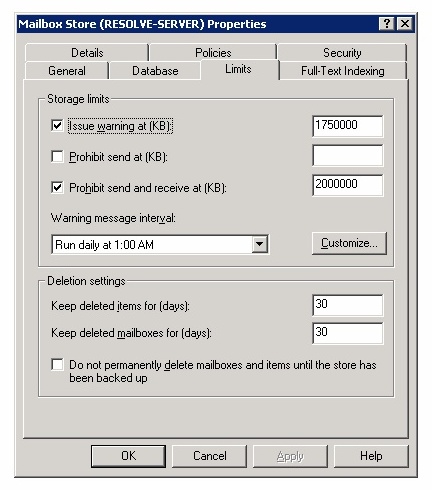
You will notice that you have the limits now displayed in KB – change the limits to your desired size, and click OK.
A few things to note
- Although this example is done in SBS, in Exchange 2003, you just need to open up the Exchange System Manager and then browse to the exchange server as above.
- This sets the default limit on the exchange mailboxes; you can manually edit the size of individual mailboxes in Active Directory. Right click on a user, properties and then select the “Exchange General” tab, and click on “Storage Limits”