Here in the UK we have all been hit by the VAT increase from 17.5% to 20% making us all that little bit poorer! But hey! If you are paying 20% your customers should too! Here we’ll show you how to apply that extra 2.5% so they can feel that same pain as you do when you buy that bar of chocolate.
Step 1
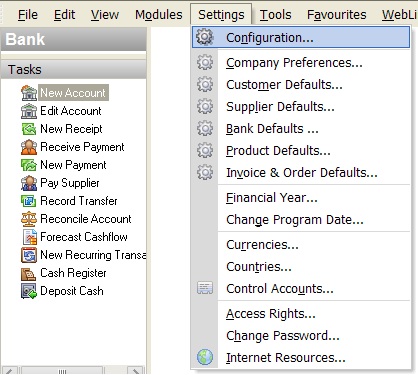
On the Settings menu, open Configuration and click on the Tax Codes tab.
Step 2
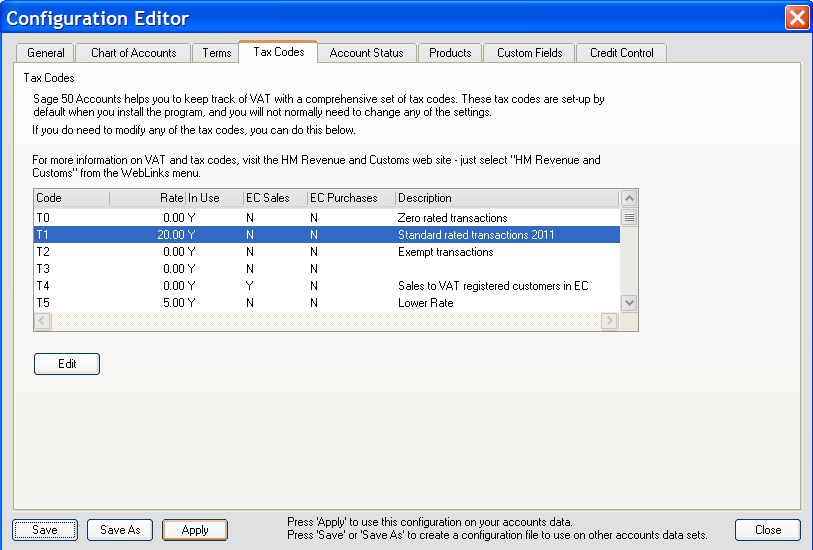
Select T1 and press the Edit button.

Step 3
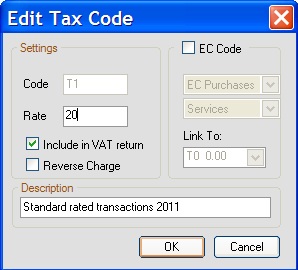
The Edit Tax Code box should appear. Change the Rate to 20. Click the OK button.
Step 4
Click the Apply button to save your changes and close the window.
This will take effect immediately so make sure you aren’t processing anything from before the VAT increase!